

CPA Ontario published a case study about a firm they called Herbert, Clarke and Heinlein (HCH) LLP. It is fictitious, but the scenario is not. A staff member, without the knowledge of senior leadership, began using a publicly available large language model to help with audit and compilation engagements. Confidential client information was uploaded into the tool. No one verified the output. Data hallucinations and errors made it into the firm’s work. Routine quality reviews caught the problem. The firm had to disclose the issue to the client. The client filed a complaint with CPA Ontario’s Standards Enforcement team.
The case study is part of the same regulatory guidance series we covered in our previous post on what CPA Ontario expects when your firm uses AI. CPA Ontario wrote the scenario to make one point clear: the absence of a policy does not mean the technology isn’t being used. It means you can’t see it.
That is shadow AI. Given the level of employee-led AI adoption across Canadian workplaces, CPA firms should not assume that the absence of reported AI use means it is not happening.
What Shadow AI Looks Like Inside a CPA Firm
Shadow AI is the use of AI tools and applications in the workplace without formal approval or oversight from the firm’s IT or leadership. It is not malicious. In most cases, staff are trying to work faster and smarter. The problem is that no one with governance responsibility knows it is happening.
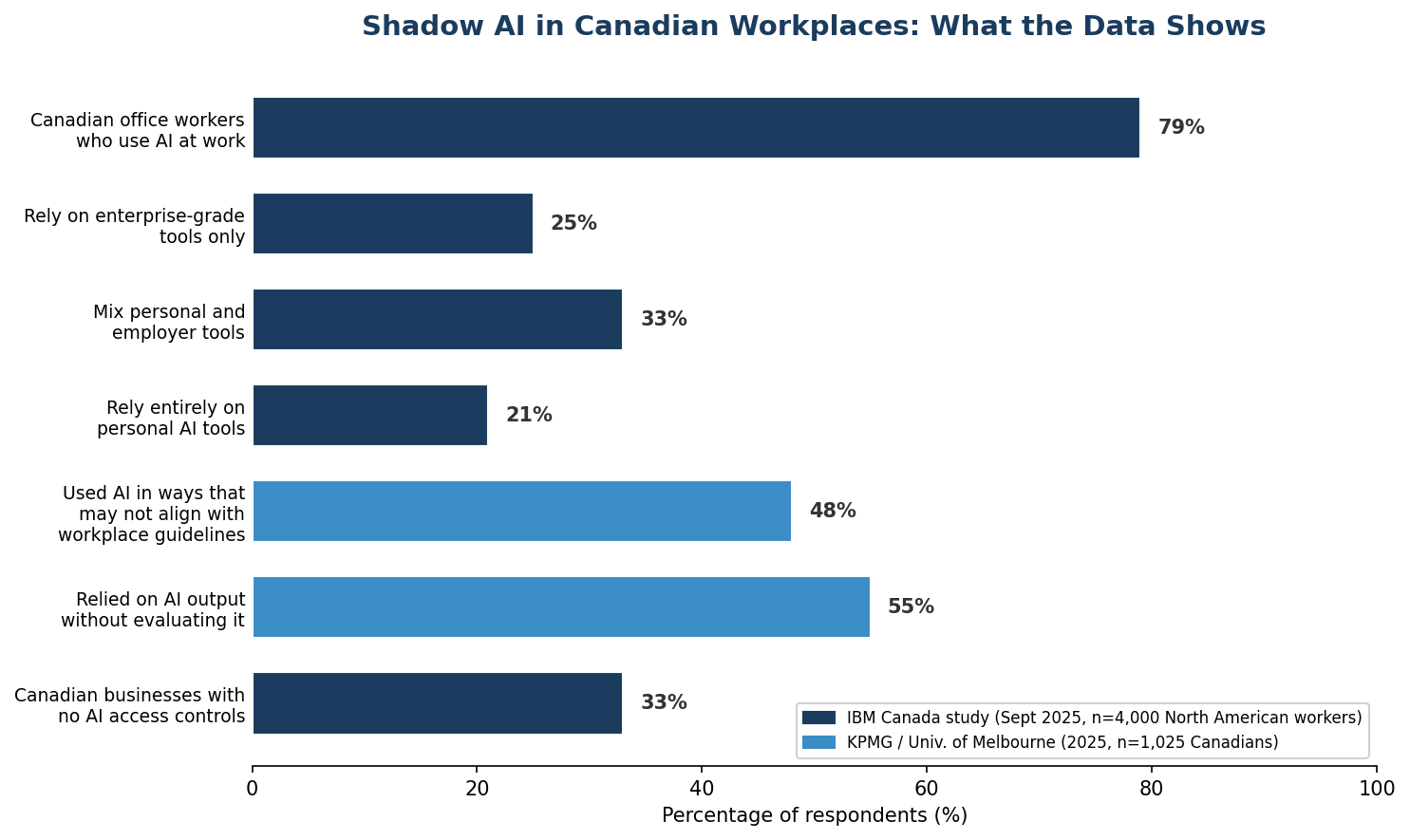
According to a study commissioned by IBM Canada in September 2025, 79% of Canadian full-time office workers use AI tools at work. Only 25% rely on enterprise-grade AI solutions. The rest use a mix of personal and employer tools (33%) or rely entirely on personal apps (21%).
Inside a CPA firm, shadow AI typically takes five forms:
- Personal AI accounts: Staff log into ChatGPT, Gemini, or Copilot using personal email addresses. The firm has no visibility into what is entered or where it goes.
- Browser-based tools: Grammarly, Canva, AI meeting transcription services, and AI writing assistants run as browser extensions or web apps. They often do not require IT installation and may not trigger any network alert.
- OAuth connections: Third-party applications connected to a staff member’s Microsoft 365 or Google Workspace credentials. These can access email, calendar, and files without the firm’s knowledge.
- Embedded SaaS AI: AI features quietly added to practice management, tax preparation, and document management software the firm already subscribes to. Vendors add these features in updates, and they are often enabled by default.
- No central inventory: The firm has no tool register, no policy, and no audit of what staff actually use. Leadership cannot manage what it cannot see.

Why Firm Leadership Cannot See It
The same IBM study found that 97% of Canadian workers said AI improves their productivity. Nearly 80% said it allows them to spend more time on strategic or creative aspects of their role. Staff are not hiding AI use because they are doing something wrong. They are hiding it, or simply not mentioning it, because there is no policy to report it under.
A 2025 KPMG and University of Melbourne study that surveyed 1,025 Canadians found that 48% acknowledged using AI in ways that may not fully align with workplace guidelines, often due to uncertainty about appropriate usage. Fifty-five per cent said they have relied on AI outputs at work without evaluating the information.
The structural reasons leadership cannot see shadow AI are straightforward:
- Browser-based tools leave no software footprint. No installation, no IT ticket, no device management record.
- Personal accounts are invisible to employer monitoring. The firm cannot audit a ChatGPT account it does not know exists.
- OAuth connections grant third-party access through existing credentials. A staff member authorizes an app to read their email or files, and the app operates under the firm’s existing Microsoft 365 or Google Workspace identity.
- Embedded SaaS features are turned on by vendors, not by the firm. An accounting software update may add an AI assistant that is enabled by default. No one in the firm approved it.
- No one is looking. Without a centralized AI inventory or a policy requiring disclosure, there is no mechanism for staff to report what they are using, and no mechanism for leadership to ask.
What Staff May Be Entering
In CPA Ontario’s fictitious case study, the staff member uploaded confidential business information for a client into a publicly available large language model. That is not an extreme scenario. It is the most common use case for AI in an accounting firm.
The types of information that staff may be entering into AI tools include:
- Financial statements and trial balances
- Tax returns and tax planning calculations
- Payroll records and employee personal information
- Client correspondence, including emails and engagement letters
- Working papers and audit documentation
- Client business plans and confidential operational data
Under the CPA Code of Professional Conduct, the CPA is responsible for protecting the confidentiality of client information. Uploading client data into a publicly available AI tool, under that tool’s default data usage terms, is a confidentiality breach regardless of whether the staff member intended it to be.
Why This Creates Professional and Business Risk
The risks from shadow AI are not theoretical. They are quantified, documented, and already costing Canadian businesses money.
The 2025 IBM Cost of a Data Breach Report found that shadow AI added an average of CA$308,000 per data breach for Canadian organizations. One in three Canadian businesses reported having no access controls on AI systems. The financial sector recorded the highest average breach cost at CA$9.97 million. Although that figure is not specific to accounting firms, it demonstrates the value and sensitivity of financial data.
The specific risks for a CPA firm break down into seven categories:
- Client confidentiality: Uploading client data into a consumer AI tool may expose it to the tool provider’s data retention and model training practices. This is a direct breach of the CPA Code’s confidentiality obligations.
- Vendor data usage and retention: Consumer AI tools may retain submitted data for model improvement. The firm has no contract with the vendor and no control over how long the data is stored or how it is used.
- Data residency: Consumer AI tools typically process data in the provider’s cloud infrastructure, which may be located outside Canada. This raises questions under PIPEDA’s cross-border data transfer provisions and, for Quebec firms, under Law 25.
- Unverified output: The KPMG study found 55% of Canadians have relied on AI outputs at work without evaluating the information. In an audit or tax context, unverified AI output can introduce material errors into client deliverables.
- Missing audit trails: When staff use personal AI tools, there is no log of what was entered, what the tool produced, or what was changed before the output went to the client. This creates a gap in engagement documentation.
- Contractual and privacy obligations: The firm’s engagement letters, client contracts, and privacy commitments may prohibit sharing client data with third parties. Shadow AI use may breach those terms without the firm’s knowledge.
- Reputational damage: In CPA Ontario’s case study, the firm had to disclose the issue to the client, who filed a complaint with CPA Ontario’s Standards Enforcement team. The firm faced potential investigation, sanctions, and publicity that could damage both the firm’s and the profession’s reputation.
How to Discover Shadow AI Without Creating a Witch Hunt
The goal of discovery is not to catch people doing something wrong. It is to understand what is happening so the firm can govern it. If the discovery process feels punitive, staff will stop disclosing and start hiding. That makes the problem worse.
Six methods, used together, give a firm a clear picture of its shadow AI exposure:
- Anonymous staff survey: Ask staff what AI tools they use, what they use them for, and what kind of information they enter. Make it anonymous. You are looking for patterns, not individuals.
- Workflow interviews: Talk to team leads about how work actually gets done. Where are the bottlenecks? Where do staff turn for quick answers? Those are the places AI tools are most likely to be in use.
- Microsoft 365 application and OAuth review: Review the list of third-party applications that have been authorized to access your Microsoft 365 tenant. Every OAuth connection is a potential data pipeline. Revoke any that are not approved.
- Expense and subscription review: Look for AI tool subscriptions on corporate cards and expense reports. Also look for personal subscriptions that staff have been expensing informally.
- Browser and network visibility: If the firm manages its network or uses a secure web gateway, review DNS and traffic logs for AI tool domains. This will not catch personal accounts on personal devices, but it will show what is happening on firm-managed equipment.
- Review AI features inside existing vendors: Go through every software subscription the firm holds and check whether AI features have been added. Contact vendors directly if needed. Ask whether AI features are enabled by default and how to disable them if they are not yet approved.
If your firm does not have the internal resources to run this review, an independent IT advisory partner can conduct it. The advantage of using an outside party is that staff are often more candid with a third party than with their own IT department.
The Immediate Controls CPA Firms Need
Once the firm knows what is in use, the controls are not complicated. For a CPA firm in the 15 to 250 employee range, seven controls cover the essentials:
- Approved-tool register: A written list of every AI tool the firm has reviewed and approved for use, with the conditions under which each may be used. If a tool is not on the register, it is not approved.
- Data-handling rules: Confidential client information must never be entered into public, personal, or otherwise unapproved AI tools. Use within an approved enterprise AI environment should be limited to authorized use cases and permitted data classifications, supported by appropriate contracts, access controls, retention settings, logging, client obligations, and human review.
- Enterprise agreements: Where staff need AI tools, move them to enterprise or business-tier licenses with data processing agreements. This shifts the tool from a consumer relationship to a contractual one with privacy and security obligations.
- Human-review requirements: Every AI-generated output that goes into client deliverables must be reviewed and verified by a person before it leaves the firm. Document that the review happened. This operationalizes CPA Ontario’s expectation that the CPA remains responsible for the quality and accuracy of the work, regardless of the technology used.
- Logging and auditability: Maintain sufficient records to identify the tool, user, use case, data classification, approval, and review status. Full prompt and response retention should depend on the engagement, privacy requirements, and the firm’s approved retention policy.
- Staff training: Train every staff member on the policy, the prohibited-data rules, and the verification requirement. Training is not a one-time event. It should be repeated when the policy changes and when new tools are added to the approved register.
- Exception and approval process: Provide a clear, simple process for staff to request approval for a new tool. If the process is bureaucratic, staff will bypass it. If it is straightforward, they will use it.
These controls directly answer the question CPA Ontario’s case study poses: what should HCH LLP have done differently? They should have put AI policies in place with clear guidelines, restrictions on confidential client data, disclosure requirements for when AI is used, and training for every member of the firm. That is the list above.
The Bottom Line
Shadow AI is not a future risk. It is a current condition. Seventy-nine per cent of Canadian office workers are already using AI tools at work. Most are not using enterprise-grade solutions. The question for CPA firm leadership is not whether staff are using AI, but whether the firm knows what they are using, what they are entering into it, and where that information goes.
If the answer to any of those questions is “I don’t know,” that is the gap. And in the context of CPA Ontario’s regulatory guidance, it is a gap the firm is accountable for.
The firms that handle this well are not the ones that ban AI. They are the ones that discover what is already happening, put clear controls in place, and give staff approved tools that let them work the way they want to work, within a framework the firm can stand behind.
Not sure what your staff are using? ITS Canada helps CPA firms and professional services organizations inventory their AI usage, assess exposure, and build the governance framework their team needs. We are an independent advisor, so the recommendation is based on what is right for your firm, not what we sell. Talk to our team about shadow AI in your firm.



