Does the conversation around cloud technology leave you feeling overwhelmed? If terms like ‘SaaS’ and ‘IaaS’ sound more like a secret code than a business solution, you’re not alone. Many Canadian business owners are hesitant to explore different cloud offerings, fearing a complex migration, uncertain security, and unpredictable costs. This confusion often prevents them from accessing powerful tools that could solve their biggest IT frustrations once and for all.
This plain-English guide is here to provide clarity and confidence. We’ll break down the different types of cloud services in simple, business-focused terms-no geek-speak, guaranteed. You’ll discover how to identify the right solutions to not only protect your critical data but also reduce costly IT spending and free up your team to focus on what truly matters: serving your customers and growing your business. It’s time to make the cloud work for you.
Decoding the Jargon: The Main Types of Cloud Offerings
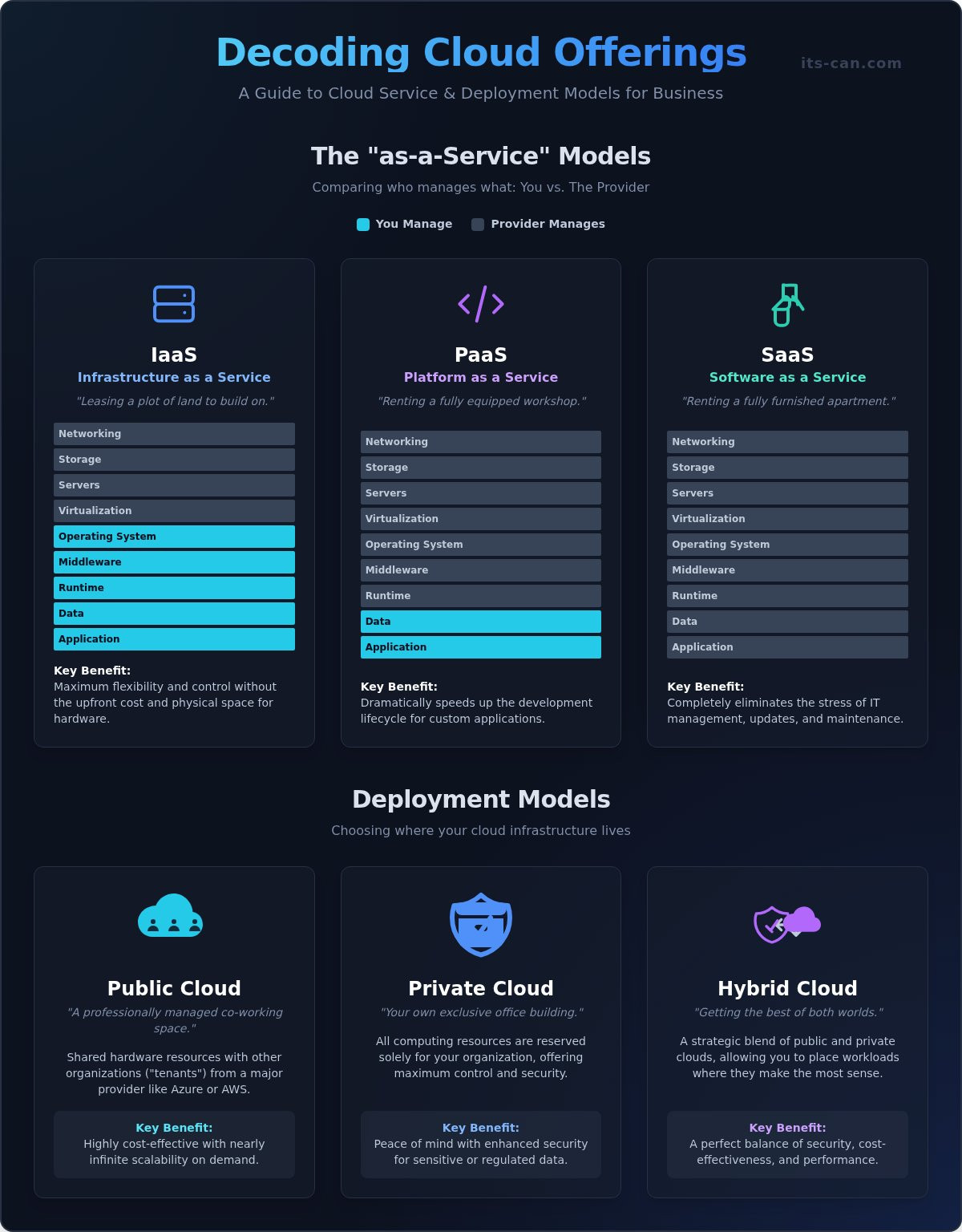
Feeling overwhelmed by tech jargon? When it comes to cloud computing, acronyms like SaaS, IaaS, and PaaS can sound more like a secret code than a business solution. Let’s cut through the noise. Think of cloud offerings not as complex technology, but as different ways to rent the tools your business needs. The core idea is simple: stop sinking capital into expensive hardware that quickly becomes outdated. Instead, you pay for what you use, turning a major capital expense into a predictable operating cost. We’ll break down the three main ‘as-a-Service’ models in plain English. Each model simply determines how much control you have versus what the provider manages for you.
Software as a Service (SaaS): Ready-to-Use Applications
Think of SaaS as renting a fully furnished apartment. You just bring your suitcase (your data) and start living. You access professional-grade software over the internet, typically on a monthly or annual subscription. This is the most common type of cloud service you likely already use.
- Common Examples: Microsoft 365 for email and documents, Salesforce for customer relationship management (CRM), and Slack for team communication.
- Key Benefit: It completely eliminates the stress of IT management. The provider handles all installation, maintenance, and security updates, freeing you to focus on your business.
Infrastructure as a Service (IaaS): Your Virtual Data Center
IaaS is like leasing a plot of land. The provider gives you the land (the core infrastructure), and you have the freedom to build whatever you want on it. You rent fundamental computing resources like virtual servers, storage, and networking from a cloud provider over the internet.
- Common Use Case: Hosting a custom-built application or a high-traffic website without having to buy and manage a physical server in your office.
- Key Benefit: It provides maximum flexibility and control without the massive upfront cost in Canadian dollars and physical space required for your own hardware.
Platform as a Service (PaaS): A Workshop for Developers
PaaS is best understood as renting a fully equipped workshop. The provider gives you the space, all the tools, and the raw materials, so your team can focus on creating. It provides a complete environment for developers to build, test, and deploy applications without the headache of managing the underlying infrastructure.
- Who It’s For: Primarily for businesses with in-house or contracted development teams building custom software.
- Key Benefit: It dramatically speeds up the development lifecycle, allowing your team to innovate faster and more efficiently.
Where Your Cloud Lives: Public, Private, and Hybrid Models
Beyond the type of service you use, it’s critical to understand where your data is physically and digitally hosted. Think of it like choosing your business’s workspace: do you need a flexible desk in a shared office, a secure private office, or a strategic combination of both? This decision directly impacts your costs, security, performance, and ability to meet compliance standards in Canada.
The choice between these deployment models is a foundational part of any cloud strategy. In fact, these models are a core component of the official NIST Definition of Cloud Computing. Selecting the right model from the various cloud offerings available is essential for optimizing your IT without creating future headaches. The right fit depends entirely on your business needs, budget, and regulatory rules like PIPEDA.
Public Cloud: The Cost-Effective, Scalable Option
The public cloud is like a massive, professionally managed co-working space. You share secure, partitioned hardware resources with other organizations (or “tenants”) from a major provider like Microsoft Azure or Amazon Web Services. Its pay-as-you-go pricing, billed in C$, makes it highly affordable for SMBs to access enterprise-grade technology without a large upfront investment. This model is perfect for websites, email, and applications with fluctuating user demand.
- Key Benefit: You get nearly infinite scalability on demand and eliminate the cost and stress of maintaining your own hardware.
Private Cloud: Your Exclusive, High-Security Environment
A private cloud is your own dedicated, exclusive office building. All the computing resources are reserved solely for your organization, whether they are hosted in your own facility or by a third party. This model offers you maximum control over security, data privacy, and performance. It is the ideal solution for businesses in industries with strict compliance and data residency requirements, such as finance, healthcare, and legal services, where protecting sensitive information is non-negotiable.
- Key Benefit: Gain peace of mind with enhanced security, complete control, and performance customized for your most sensitive workloads.
Hybrid Cloud: Getting the Best of Both Worlds
Why choose just one? A hybrid cloud provides the ultimate flexibility by strategically blending public and private cloud environments, allowing them to work together seamlessly. This approach lets you keep highly sensitive data and critical applications on a secure private cloud while leveraging the public cloud’s scalability and cost-efficiency for less sensitive tasks. For example, you could host your confidential customer database privately while running your public-facing marketing website on the public cloud.
- Key Benefit: Achieve a perfect balance of security, cost-effectiveness, and performance tailored to your specific business needs.
The Real-World Benefits of Cloud Offerings for Your Business
Adopting cloud technology isn’t just about keeping up with the latest trends; it’s a strategic business decision that solves some of the most common and frustrating problems you face. Forget the “Geek-Speak”-let’s talk about what this means for your daily operations, your team’s productivity, and your bottom line. The right cloud offerings eliminate headaches like unexpected downtime and massive upfront hardware costs, freeing you to focus on what you do best: running your business.
Here’s how these models translate into tangible, real-world advantages.
Shift from Capital Expense (CapEx) to Operating Expense (OpEx)
Are you tired of paying huge upfront costs for servers and hardware that become obsolete in just a few years? The cloud changes that financial burden completely. Instead of a large, one-time capital expense, you switch to a predictable and manageable monthly operating expense. This strategic shift has powerful benefits:
- Free Up Cash Flow: Stop tying up your capital in depreciating assets. Invest that money back into marketing, hiring, or other areas that actively grow your business.
- Predictable Budgeting: A flat-rate monthly fee makes budgeting for your IT simple and stress-free. No more surprise repair bills or replacement costs.
- Ultimate Flexibility: Your business isn’t static, and your IT shouldn’t be either. Easily scale your services up or down as your needs change, ensuring you only pay for what you use.
Enable Secure Remote Work and Collaboration
In today’s competitive Canadian job market, offering flexibility is key to attracting and retaining top talent. Cloud services make this possible without sacrificing security. Your team can securely access company files, data, and applications from anywhere with an internet connection. Tools like Microsoft 365 allow for seamless, real-time collaboration on documents, spreadsheets, and presentations. Plus, centralizing your data in the cloud is far more secure than having it scattered across individual laptops that can be lost, stolen, or damaged.
Strengthen Business Continuity and Disaster Recovery
Ask yourself this critical question: what would happen to your business if a fire, flood, or major theft destroyed your office tomorrow? If your data is stored on-site, you could face catastrophic, business-ending data loss. With the cloud, your critical information is kept safe in highly secure, off-site data centres. This means you can restore your operations quickly after any disruption, minimizing costly downtime and protecting your reputation. It’s the ultimate peace of mind, knowing your business is protected no matter what happens at your physical location.
How to Choose the Right Cloud Offerings for Your Company
With countless services from providers like Amazon, Microsoft, and Google, the world of cloud computing can feel overwhelming. The key to success isn’t chasing the latest technology; it’s starting with your business goals. By focusing on what you need to achieve, you can find the right cloud offerings that fit your company perfectly and avoid the costly mistake of paying for services you don’t use.
This simple, three-step process will help you cut through the noise and build a clear path forward.
Step 1: Assess Your Current IT Environment and Pains
Before you can plan your future, you need a clear picture of your present. A frank assessment of your current IT helps identify the specific problems you need the cloud to solve. This isn’t about tech jargon; it’s about business pain. Ask yourself:
- What essential applications do we rely on every day?
- Are we constantly dealing with slow performance or aging, unreliable hardware?
- Where are our most significant security risks and vulnerabilities?
- How much are we currently spending on IT maintenance, hardware refreshes, and software licenses?
Step 2: Define Your Business and Security Needs
The right cloud solution should be a business enabler, supporting your growth and protecting your data. This means looking ahead and defining your non-negotiable requirements for performance, security, and compliance. Consider your long-term vision:
- Do we have specific compliance needs, such as PIPEDA for handling Canadian customer data?
- How much growth are we planning for in the next 3-5 years?
- What level of uptime do our most critical applications require to avoid costly downtime?
- What is our realistic monthly budget for operational IT expenses in C$?
Step 3: Determine Your Management and Support Needs
Moving to the cloud is not a “set it and forget it” solution. It requires ongoing management, security monitoring, and user support. Be honest about your internal capacity to handle these critical tasks. Who will be responsible when things go wrong?
- Does our in-house IT team have the specialized expertise to manage a cloud environment?
- Who will handle proactive security monitoring, patching, and threat response?
- Who will be available to manage user access and provide support to our employees?
Feeling overwhelmed by the questions? You don’t have to figure it out alone. A clear strategy is the first step to eliminating IT frustrations for good. Let’s plan your cloud strategy together.
Why Partnering with an MSP is Your Smartest Cloud Move
Thinking about moving to the cloud can feel overwhelming. While the benefits are clear, the path to get there is often filled with technical hurdles. A DIY approach frequently leads to unexpected problems: security vulnerabilities, surprise bills in Canadian dollars, and frustrating downtime that hurts your business. This is where a Managed Service Provider (MSP) becomes your most valuable asset. We act as your expert guide, handling the complex technology so you can focus on running your business, not your IT. Working with a professional IT service provider ensures you have the right expertise and support to navigate your cloud journey successfully.
Expert Strategy and Migration
A successful cloud transition is more than just moving files; it starts with a smart plan. We analyze your specific business needs, workflows, and goals to create a tailored cloud roadmap. Our team then manages a seamless and secure migration, ensuring minimal disruption to your daily operations. We help you avoid the common pitfalls that lead to costly rework, getting it right the first time.
Proactive Security and Management
Once you’re in the cloud, who is watching over your data? Our job is to be your vigilant technology partner. We provide:
- 24/7 Proactive Monitoring: We watch your cloud environment around the clock to detect and prevent issues before they can cause downtime.
- Expert Security Management: Our specialists handle all security patches, updates, and threat detection, giving you enterprise-grade protection without the high cost of an in-house team.
- Compliance and Peace of Mind: We help ensure your data management aligns with Canadian privacy regulations like PIPEDA.
Cost Optimization and Ongoing Support
Cloud costs can easily spiral out of control if not managed properly. We continuously monitor your usage of different cloud offerings to optimize services, ensuring you only pay for what you actually need. And when your team has a question or runs into an issue? They get fast, friendly help desk support from a team that already knows your setup. You get the peace of mind that comes with a single, accountable point of contact for your entire IT infrastructure.
Instead of adding “IT expert” to your long list of responsibilities, partner with a team dedicated to your success. Let us solve your IT nightmares once and for all, so you can get back to what you do best: growing your business.
Making the Right Cloud Choice for Your Business
Navigating the world of the cloud doesn’t have to be a headache. As we’ve seen, understanding the difference between IaaS, PaaS, and SaaS, and choosing the right deployment model-be it public, private, or hybrid-is the foundation for unlocking powerful benefits like improved flexibility and security. The key isn’t just knowing the options, but strategically selecting the right cloud offerings to align perfectly with your business goals and eliminate costly IT frustrations.
But you don’t have to make this critical decision alone. Instead of getting lost in technical jargon, let a trusted partner guide you. Since 2009, our Toronto-based team of experts has been helping businesses across the GTA build and manage their cloud infrastructure. We handle the complexity with proactive 24/7 monitoring and management, and we promise to explain everything in plain English-no ‘geek-speak’ guaranteed.
Ready to get the peace of mind that comes from a solid cloud strategy? Book a free consultation to build your business’s cloud strategy. Let’s put an end to your IT challenges, finally and forever.
Frequently Asked Questions About Cloud Offerings
Are cloud offerings secure for my business data?
Absolutely. Leading cloud providers like Amazon Web Services (AWS) and Microsoft Azure invest billions in security-far more than a typical business can afford. Your data is protected by multiple layers of security, including advanced encryption both in transit and at rest, and 24/7 monitoring. These platforms are built to comply with strict Canadian data privacy regulations like PIPEDA, giving you the peace of mind that your critical information is properly safeguarded from threats.
What’s the difference between cloud services and traditional web hosting?
Think of traditional web hosting like renting a single, fixed-size office space; you get a set amount of server space and resources. Cloud services are more like having access to an entire business park. You can scale your resources up or down instantly-from storage to computing power-and only pay for what you use. It’s a flexible, on-demand model that supports your entire business operation, not just a website, providing far greater agility and efficiency.
Will moving to the cloud be more expensive than my current setup?
Not necessarily. The cloud changes your spending from large, unpredictable capital expenses (like buying a new C$10,000 server) to a predictable monthly operating cost. When you factor in the hidden costs of on-premise hardware-such as electricity, cooling, maintenance, and emergency repairs-many Canadian businesses find that a well-planned cloud strategy actually lowers their total IT spending. It allows you to eliminate waste by paying only for the resources you truly need, optimizing your budget.
How long does it take to migrate a business to the cloud?
The timeline depends entirely on the complexity of your business. A simple migration of emails and files could be completed in a few weeks with minimal disruption. However, moving custom applications or complex databases requires a more detailed strategy and can take several months. A proper migration plan, designed by an experienced partner, is key. This ensures a smooth, phased transition that lets you focus on running your business without costly downtime or frustrating interruptions.
Can I use different cloud providers for different services?
Yes, you absolutely can. This strategy is called a multi-cloud approach, and it’s becoming very common. For instance, you might use Microsoft 365 for your email and office applications while using Amazon Web Services (AWS) for your custom software hosting. By selecting the best cloud offerings from different providers, you can optimize performance and cost for each specific business need. This prevents you from being locked into a single vendor and gives you maximum flexibility.
What happens to my data if I decide to switch cloud providers?
Your data always belongs to you, not the cloud provider. Reputable providers offer clear processes and tools to export your information. Before committing to any service, a key step is to establish an exit strategy. This ensures you know exactly how to retrieve your data if you choose to switch providers or bring it back in-house. A professional IT service provider can manage this entire process for you, guaranteeing a secure and complete transfer without data loss.